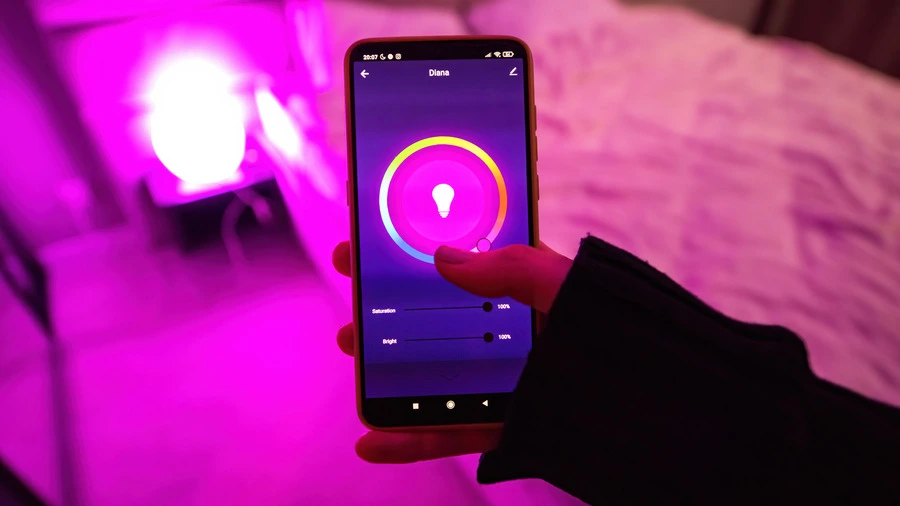
Installing a smart lightbulb can greatly improve your home lighting experience. With just a few simple steps, you can control your lights from your phone or even with your voice. This guide will walk you through the process of selecting, installing, and enjoying your new smart lightbulb, making your home smarter and more efficient.
Key Takeaways
- Choose a smart bulb that fits your existing light fixtures and is compatible with your home system.
- Always follow safety measures when changing lightbulbs, ensuring the power is off before starting.
- Use the manufacturer's app to set up and control your smart light for the best experience.
- Integrate your smart bulb with voice assistants for hands-free control.
- Regularly check for updates to keep your smart light functioning smoothly.

When it comes to selecting the perfect smart lightbulb for your home, there are several factors to consider. Smart bulbs are not just about convenience; they can enhance your living space significantly.
Smart bulbs come in various types, including:
Before purchasing, check for:
Smart bulbs are generally more energy-efficient than traditional bulbs. Here’s a quick comparison:
| Type of Bulb | Average Lifespan | Energy Consumption |
|---|---|---|
| Standard LED | 15,000 hours | 10-15 watts |
| Smart LED | 25,000 hours | 8-12 watts |
| Incandescent | 1,000 hours | 60 watts |
Smart bulbs can save you money in the long run due to their energy efficiency and longer lifespan.
In summary, choosing the right smart lightbulb involves understanding the types available, ensuring compatibility with your home system, and evaluating their energy efficiency. This way, you can enjoy the benefits of smart lighting while enhancing your home environment.
Before you start installing your smart lightbulb, it’s important to prepare properly. This ensures a smooth installation process and helps avoid any issues later on.
To install your smart lightbulb, you will need the following tools and materials:
Safety precautions are crucial during installation. Here are some steps to follow:
Every smart lightbulb may have different requirements. Make sure to:
Remember: Following the manufacturer's instructions is key to a successful installation. This will help you avoid common mistakes and ensure your smart lightbulb works correctly.
Once you have gathered your tools and ensured safety, you are ready to proceed with the installation!
To begin your smart lighting setup, first, ensure the light fixture is switched off. Then, remove the old bulb and screw in the smart bulb. Make sure the fixture is in a location with a strong Wi-Fi signal to avoid connectivity issues. Remember:
Next, you need to connect the smart bulb to your home network. This usually involves using a companion app. Follow these steps:
Once connected, you can configure the settings of your smart bulb. This may include:
Tip: If you encounter issues, consult the manufacturer's instructions or consider hiring a licenced electrician to ensure compliance with local wiring regulations. This is especially important if you need to replace light switches or make any wiring connections in your home.
To make your smart lightbulb even more convenient, you can connect it to voice assistants like Alexa or Google Home. This allows you to control your lights using simple voice commands. For example, you can say, "Turn on the living room lights" or "Dim the bedroom lights". This integration makes your home smarter and easier to manage.
Most smart lightbulbs come with a dedicated mobile app that lets you control your lights from anywhere. Here are some features you can expect:
You can also set up automation for your smart lightbulbs. This means they can turn on or off automatically based on certain conditions. For example:
Integrating your smart lightbulbs with your home electrical systems can greatly enhance your home improvement efforts, making your living space more efficient and enjoyable.
If your smart lightbulb isn't connecting, try the following steps:
Flickering or dimming can be annoying. Here are some solutions:
Keeping your smart lightbulb updated is crucial for performance. Follow these steps:
Remember, compliance with safety standards is essential when dealing with electrical devices. Always ensure your setup meets local circuit regulations and code compliance to avoid hazards.
Smart lighting can transform your home in many ways. Here are some key benefits:
Smart lighting systems offer more than just convenience. By using LED bulbs and automated schedules, they drastically reduce electricity usage.
In summary, maximising the benefits of smart lighting not only enhances your home’s atmosphere but also promotes energy efficiency and aligns with local electrical codes for safe lighting installation. Embrace the future of lighting and enjoy the convenience and savings it brings!
To keep your smart lightbulb in good shape, follow these simple care tips:
Regularly check how your smart bulb is performing. Here are some things to look out for:
When it’s time to replace your smart bulb, consider these steps:
Remember, regular electrical maintenance can extend the life of your smart lighting system. Keeping an eye on performance and following safety tips will ensure your home remains well-lit and efficient!
To keep your smart lightbulb shining bright, regular maintenance is key. Make sure to clean the bulb gently and check for any software updates. If you need more tips or want to explore the best local tradesmen for your home, visit our website today!
Installing smart light bulbs in your home is a straightforward task, even if you’re not tech-savvy. Here’s a quick recap of the steps: First, take out your old bulbs and replace them with the smart ones. Next, download the necessary app on your phone or tablet. After that, create an account or log in. Make sure the light fixtures are switched on, then add the smart bulbs to the app. Follow the instructions provided in the app to complete the setup. Finally, enjoy controlling your lights with your voice or through your device. Don’t forget to recycle any old packaging and dispose of the old bulbs properly.
Yes, you can use smart bulbs outside, but make sure to choose ones that are made for outdoor use.
Yes, smart bulbs come in different shapes and sizes, so there’s one for almost any lamp.
Look for things like brightness control, colour options, and compatibility with your smart home system.
You can control it using a smartphone app or voice commands if you have a smart speaker.
Make sure the bulb is within range of your Wi-Fi and check your router settings.
Turn it off and let it cool down, then wipe it gently with a soft cloth.
Disclaimer: The information provided in this blog is for general informational purposes only and should not be considered a substitute for professional advice. All work, including but not limited to electrical, plumbing, and construction, carries risks and should only be undertaken by qualified professionals. For specific guidance on any work, consult a certified professional in the relevant field. Always ensure compliance with local regulations and safety standards.

